
Optional
This component is an optional feature in the metaverse_client crate. Projects that don't require this can compile with the feature disabled in Cargo.tomlAgent
Agents are the representation of the user, and other players in the 3d world. The agent sruct stores player locations, outfit data, and skeleton data.Implementing agents requires using the FetchInventoryDescendents2, ViewerAsset endpoints, along with the inventory crate enabled. If you are unfamiliar with how capabilities work, visit the capabilities page on these docs.
Agent data begins the same way all object data does. Through the ObjectUpdate packet.
1.
The type of the ObjectUpdate is determined to be Avatar . The user's agent data is handled through the Inventory system, and must be retreived through a capability endpoint.
2.
If the session's agent ID is equal to the message's ID , then the objectUpdate is requesting to render the current user's model.
3.
Check if the user's inventory has loaded its CurrentOutfit yet. This is done using the inventory, which should have begun downloading folders and metadata immediately after login. If it is not loaded yet, requeue the request and try again later.
4.
Add the requested user ID to the agent_list, the session-global list of all agents. This will contain its ID, position, and the number of items in the current outfit.
5.
Download all of the assets from the inventory's CurrentOutfit folder. This currently contains just the item metadata. The metadata will be used to make a request to the ViewerAsset capability, which contains the full mesh and skin data from the server.
Fetch assets from ViewerAsset endpoint
Downloading agent assets is handled by the mailbox using a DownloadAgentAsset message. Each object in the outfit is sent individually to the mailbox for handling, which allows actix to schedule each download asyncronously, preventing bottlenecks.The ViewerAsset endpoint expects requests in the format of
http://[UUID OF VIEWERASSET ENDPOINT]?[OBJECT TYPE]_id=[ASSET ID]
In practice, this looks like
http://da4b15ea-1d97-4140-afe3-2dd1ce5560710000?bodypart_id=da4b15ea-1d97-4140-afe3-2dd1ce5560710000
If the agent asset is an Object,
Download it
from the ViewerAsset capability endpoint. This will return an LLSD-XML
encoded SceneGroup, which will be
parsed
into a usable SceneGroup object for further operations.
If the object is a Link, download it and add it directly to the agent list as an Item.

LLSD Formats
The ViewerAsset endpoint does not respond with uniform encodings. Some requests will result in XML, some will result in a custom JSON-adjacent format, and some will result in a custom whitespace seperated format. These can be very confusing and difficult to debug.Item
Notation SerializationItems are encoded using a completely unique newline seperated notation. Parsing must be done character by character.
LLWearable version 22
New Pants

	permissions 0
	{
		base_mask	00000000
		owner_mask	00000000
		group_mask	00000000
		everyone_mask	00000000
		next_owner_mask	00000000
		creator_id	11111111-1111-0000-0000-000100bba000
		owner_id	11111111-1111-0000-0000-000100bba000
		last_owner_id	00000000-0000-0000-0000-000000000000
		group_id	00000000-0000-0000-0000-000000000000
	}
	sale_info	0
	{
		sale_type	not
		sale_price	10
	}
type 5
parameters 9
625 0
638 0
806 .8
807 .2
808 .2
814 1
815 .8
816 0
869 0
textures 1
2 5748decc-f629-461c-9a36-a35a221fe21f
Mesh
LL binary format.Mesh Asset Format
The data structure starts out with a header in LL binary format.
The header is uncompressed and contains the offset positions for each of the compressed values.
Extracted from the binary format to a HashMap, it looks something like this.
Map({ skin: Map({ size: Integer(598), offset: Integer(0) }),
      physics_convex: Map({ size: Integer(204), offset: Integer(598) }),
      lowest_lod: Map({ size: Integer(1305), offset: Integer(802) }),
      low_lod:Map({ size: Integer(2246), offset: Integer(2107) }),
      medium_lod: Map({offset: Integer(4353), size: Integer(7672) }),
      high_lod: Map({ size:Integer(27225), offset: Integer(12025) }), });
SceneGroup
XML Serialization The SceneGroup returns much more standard XML.<SceneObjectGroup>
<RootPart>
<SceneObjectPart xmlns:xsi="http://www.w3.org/2001/XMLSchema-instance"
xmlns:xsd="http://www.w3.org/2001/XMLSchema">
<AllowedDrop>false</AllowedDrop>
<CreatorID>
<UUID>fb2e5541-66ba-4019-a5de-e8b9286b0914</UUID>
</CreatorID>
<FolderID>
<UUID>ea04498f-daca-4a86-9ebb-9ce704f78e62</UUID>
</FolderID>
<InventorySerial>0</InventorySerial>
<UUID>
<UUID>ea04498f-daca-4a86-9ebb-9ce704f78e62</UUID>
</UUID>
<LocalId>403012829</LocalId>
<Name>body</Name>
<Material>3</Material>
<PassTouches>false</PassTouches>
<PassCollisions>false</PassCollisions>
<RegionHandle>1099511628032000</RegionHandle>
<ScriptAccessPin>0</ScriptAccessPin>
<GroupPosition>
<X>-3.7252903E-09</X>
<Y>0.21699509</Y>
<Z>4.656613E-10</Z>
</GroupPosition>
<OffsetPosition>
...
Download Mesh
Each SceneGroup can contain one or several parts, which each contain their own mesh. Each mesh needs to be downloaded individually.
Apply Bind Shape Matrix
Download each scene's mesh and Apply the skin bind shape matrix to the vertices retreived from the server. If the bind shape matrix is not applied, the model will look distorted.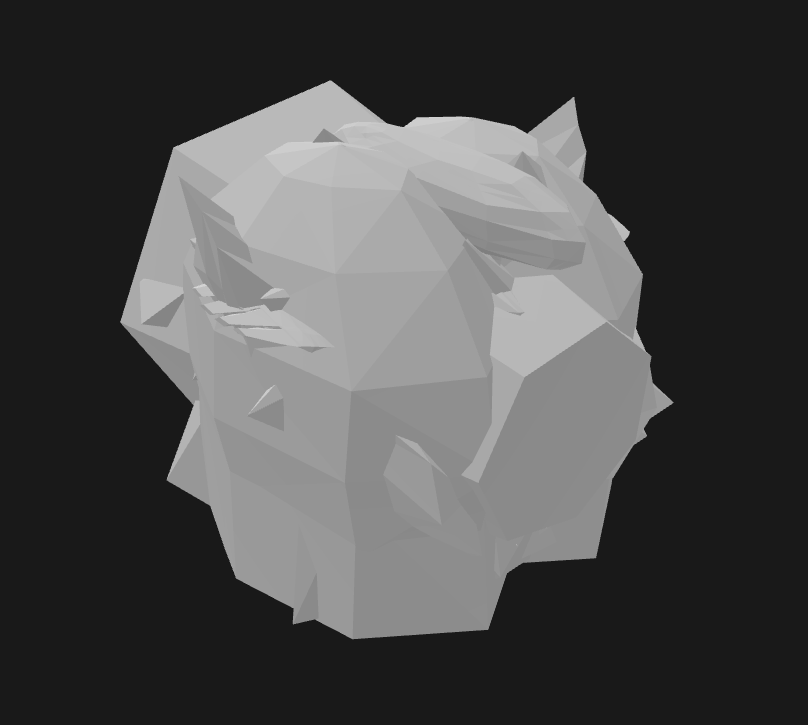
Bind Shape Matrix Not Applied
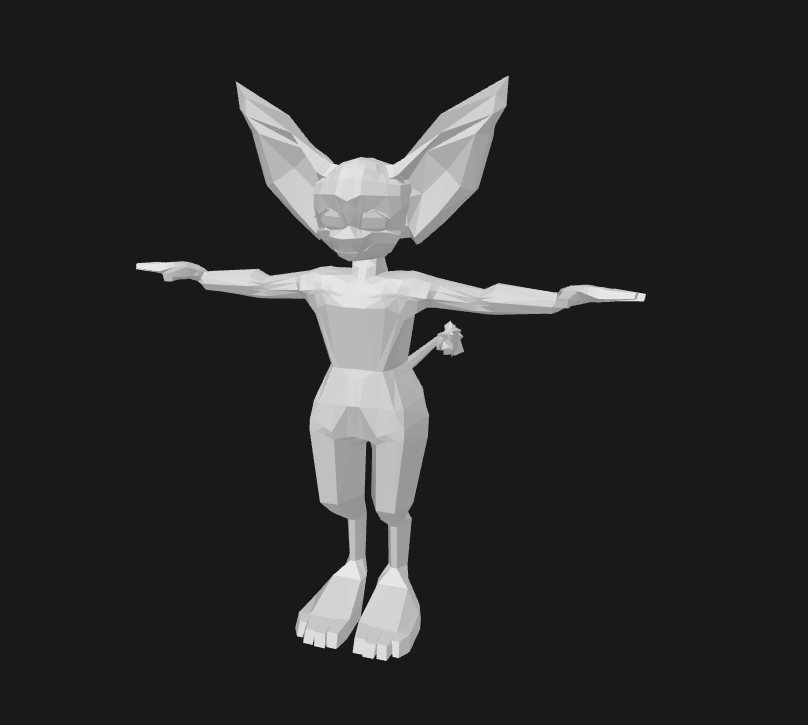
Bind Shape Matrix Applied
Sculpt Texture
There are several UUIDs throughout the SceneGroup, but only one of them can be used to request the mesh from the ViewerAsset endpoint. Unintuitively, this is found in the scene's sculpt texture. The sculpt data in the SceneGroup is an artifact from the days of SculptTextures, and has gradually evolved to include modern mesh information.Skeleton
Skeleton handling in open metaverse projects can be tricky. The assumption from the server is that each client will have its own downloaded base skeleton, which all skinned meshes will use as a reference when managing their bone structure.create_skeleton() begins the process of handling the skeleton for the individual SceneObject.
The default global skeleton is stored in skeleton.gltf. This can be opened in blender by importing the file as GLTF to view the bones.
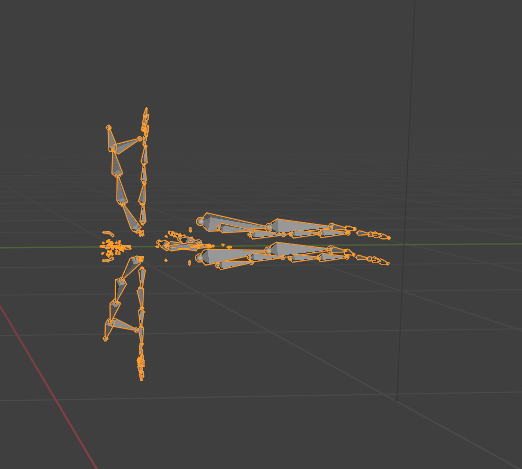
This skeleton is made useable by the build.rs build script that is run at compile time. This generates a Skeleton object, which can be placed in code as a fully defined skeleton with the default transforms.
IBMs
The reason the default skeleton is necessary is because the server does not store the joint rotations. The IBM field in the Mesh object's Skin is retrieved from the server as almost exclusively the identity matrix.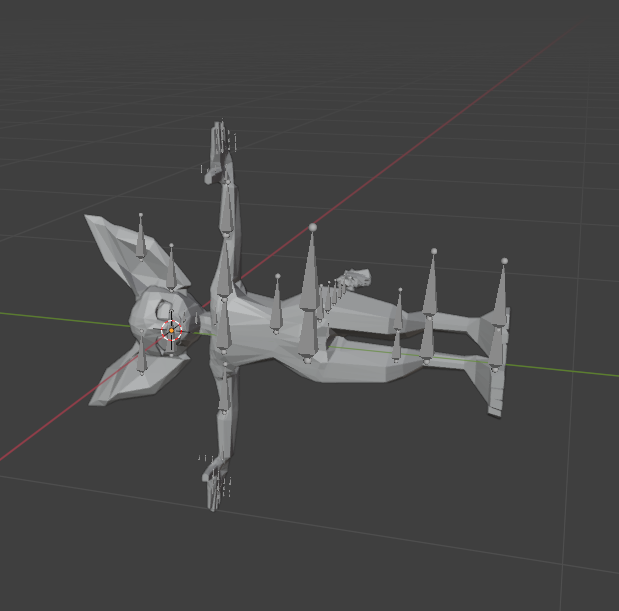
Only Server IBMs Applied
Example:
Mat4 { x_axis: Vec4(1.0, 0.0, 0.0, 0.0),
       y_axis: Vec4(0.0, 0.9999889, 0.0, 0.0),
       z_axis: Vec4(0.0, 0.0, 0.9999904, 0.0),
       w_axis: Vec4(0.001931607, -0.04089581, 0.00318855, 1.0) }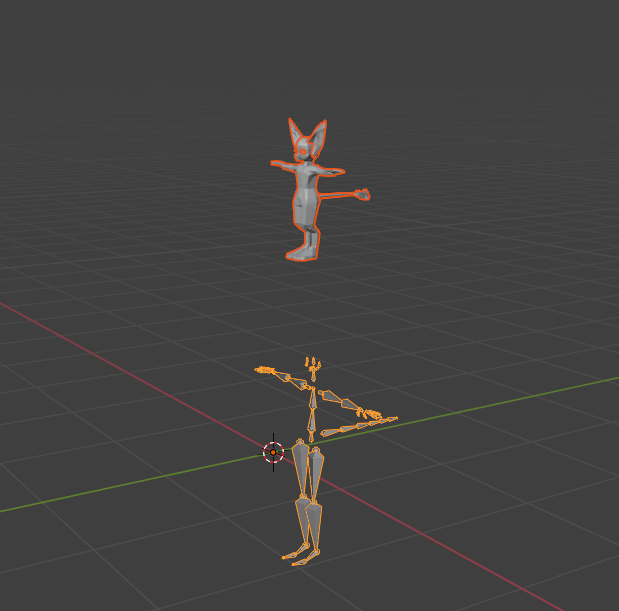
Only Default IBMs Applied
Example:
  Mat4 { x_axis: Vec4(-3.5313367e-6, 1.0, -8.005451e-6, -0.0),
         y_axis: Vec4(-0.8080318, -1.2663957e-5, -0.58910865, 0.0),
         z_axis: Vec4(-0.5891205, 4.293412e-6, 0.8080454, -0.0),
         w_axis: Vec4(-1.5247067, -0.11596913, 2.2314665, 1.0) }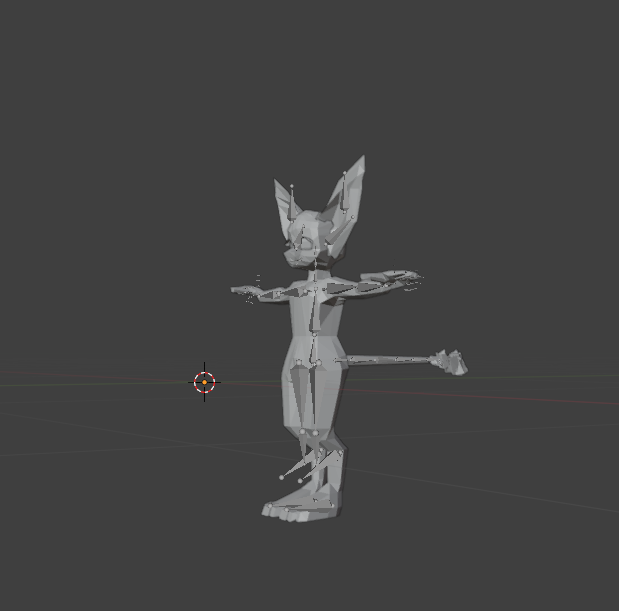
Default Rotations * Server Transform
Example:
  Mat4 { x_axis: Vec4(-3.5313367e-6, 1.0, -8.005451e-6, -0.0),
         y_axis: Vec4(-0.8080318, -1.2663957e-5, -0.58910865, 0.0),
         z_axis: Vec4(-0.5891205, 4.293412e-6, 0.8080454, -0.0),
w_axis: Vec4(0.0, 0.0, 0.0, 1.0) }Example:
Mat4 { x_axis: Vec4(1.0, 0.0, 0.0, 0.0),
y_axis: Vec4(0.0, 0.9999889, 0.0, 0.0),
z_axis: Vec4(0.0, 0.0, 0.9999904, 0.0),
w_axis: Vec4(0.001931607, -0.04089581, 0.00318855, 1.0) }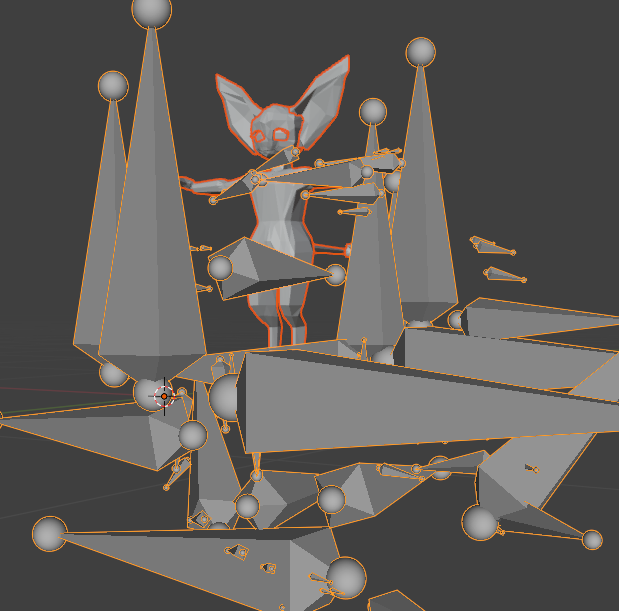
Default Rotations * Server Transform
Example:
  Mat4 { x_axis: Vec4(-3.5313367e-6, 1.0, -8.005451e-6, -0.0),
         y_axis: Vec4(-0.8080318, -1.2663957e-5, -0.58910865, 0.0),
         z_axis: Vec4(-0.5891205, 4.293412e-6, 0.8080454, -0.0),

         Replace the W axis:
w_axis: Vec4(-1.5247067, -0.11596913, 2.2314665, 1.0) }Example:
Mat4 { x_axis: Vec4(-3.5313367e-6, 1.0, -8.005451e-6, -0.0),
y_axis: Vec4(-0.8080318, -1.2663957e-5, -0.58910865, 0.0),
z_axis: Vec4(-0.5891205, 4.293412e-6, 0.8080454, -0.0),
w_axis: Vec4(0.001931607, -0.04089581, 0.00318855, 1.0) }in order to determine the local transforms, a simple calculation is done on each joint.
Parent
*Child Inverse
Save JSON
Now that we have the full SceneObject and handled its skeleton, we are almost ready for rendering. The rendering component expects the path to an AvatarObject serialized as JSON.AvatarObjects contain a serialized Skeleton object, which represents the global skeleton of the avatar, and a list of paths to the RenderObjects which contain the vertices and indices of each component mesh. This allows previews to be generated from individual RenderObjects, or outfit objects to be updated, without having to parse or regenerate entire files.
The handled object gets written to disk, where it will be added to a full AvatarObject once the rest of the outfit has downloaded.
Agent List
The agent list is the list of all agents visible to the user, including itself. Once an object is ready to be rendered, it adds it to the list of outfit items in the agent list.
Global Skeleton
Creating a global skeleton seems easy in theory, but this gets complicated when outfit objects can stream in in any order, and the skeleton can be deformed by any object.For example, a model might have a "body" object that has custom joint positions for every joint. The player might then have a "shirt" object equipped that has different joint positions for joints that the body has already morphed. Depending on which one loads first, the shirt or the body's transforms might be applied to the global skeleton, and the model will render looking deformed.
To handle this, each joint in the skeleton object stores its transforms as a vector. Each transform then has a rank which is increased when multiple objects load in with the same joint transform values. The Transform vector is organized in order of highest to lowest transform rank, with the highest always being the one that renders.
Each time an object is added to an agent through the agent list, the model's transforms are added to the global agent skeleton.