Texture Handling
Textures in the OpenSimulator protocol are handled in a bit of an unusual way. SceneObjects contain Shape data, which contain a TextureEntry field per face, along with TextureCoordinates and TextureCoordinateDomains being stored in the MeshGeometry of a Mesh. This system of faces, domains and coordinates can create some confusion when trying to handle textured meshes.
MeshGeometry Texture Domains
Mesh objects are downloaded from the server containing their position, physics representation, skinning information, and level of detail mesh data. This raw data contains the mesh's vector of TextureCoordinates. These coordinates correspond to each of the vertices in the mesh, giving x,y (otherwise called u,v) positions on the texture image that correspond to each of the vertices.When sent out from the server, however, the vertices are quantized by the TextureCoordinateDomain. These domain values can be thought of as coordinates on your texture that draw a square around the relevent texture pixels that are used by your model.
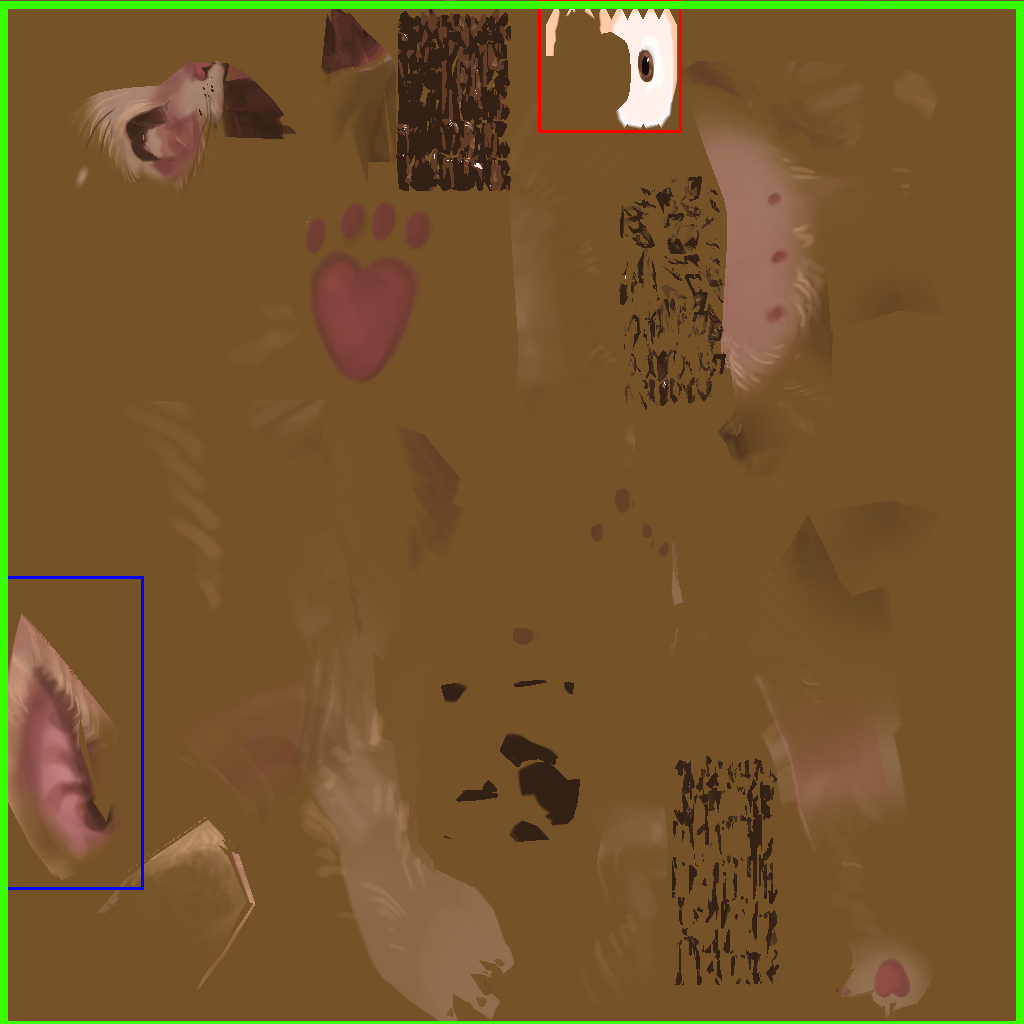
Visualizing Texture Coordinate Domains
This is the texture for the puffball model.● The texture domain for the eye would be roughly the bounding box illustrated by the red box.
● The texture domain for the ear would be the bounding box illustrated by the blue box.
●The texture domain for the main body model would be the bounding box illustrated by the green box.
This allows models with textures on small sub-components of the mesh to be rendered more exactly.

False Positives
For many models, the texture coordinate domain's bounding box can be the entire texture.If the texture domain is not handled correctly, you could have textures appearing perfectly normally for meshes with a full-image domain, while the texture applied to other meshes are in the complete wrong area of the image file.
This is made harder to debug in meshes that contain sub-meshes. If the main body of your mesh is using the full image as its domain, sub-meshes could be using smaller domains, and end up rendering incorrectly.
In order to de-quantize the data, you need to apply the domain. This is done by Benthic here.
The correct formula for de-quantizing the UV data is
Normalize The Texture Coordinates
UV coordinates are passed from the server to the client as u16s. These need to be converted to floating point UV coordinates, which can be done by dividing the u16 by 65535.
let u_norm = tc.u as f32 / 65535.0;
let v_norm = tc.v as f32 / 65535.0;
Apply The Domain
The domain can be applied using linear interpolation. This effectively takes the domain's minimum corner, adds the u position from the quantized data, and multiplies it by the difference between the maximum and the minimum. The normalized value represents how far into the range the point is. Doing this operation gets the real x,y pixel location of the vertex on the texture.
domain.min[0] + u_norm * (domain.max[0] - domain.min[0]),
1.0 - (domain.min[1] + v_norm * (domain.max[1] - domain.min[1]))